
Best overall for full-history relationship analysis: Grey Mirror from Justlay. Best for questions about selected passages: ChatGPT. Best for spreadsheet-based review: Microsoft Excel. This 2026 chat analyzer comparison covers seven apps, including dedicated relationship analysis, general-purpose assistants, and tools for examining message data yourself.
- Grey Mirror is the best-fit chat analyzer for reviewing a full relationship history with evidence-linked findings.
- ChatGPT, Claude, and Gemini support guided reflection; their interpretations are not evidence of another person's intentions.
- Microsoft Excel, Google Sheets, and Jupyter Notebook suit readers who want to define their own analysis.
- Choose by evidence traceability, export compatibility, privacy requirements, and how much setup you will do.
Why this matters
A chat analyzer should help you inspect communication, not deliver a verdict about someone you care about. A finding about unanswered questions is different from a claim that your partner deliberately ignored you.
This is a brand-authored comparison published for Justlay, not an independent review or a hands-on performance benchmark. The recommendations distinguish documented product features from suggested uses of general-purpose tools. Not every option below is a dedicated relationship-analysis app.
For a 2026 shortlist, start with your question: do you need a timeline across an existing relationship, help reflecting on a breakup, or simply a way to count and organize messages?
What makes the best chat analyzer
- Evidence traceability: You should be able to inspect the messages behind an interpretation, rather than accept a summary alone.
- History coverage: Full-history review and discussion of a selected exchange answer different questions. Check what you actually supplied.
- Export compatibility: Choose a workflow that accepts your messaging source without quietly losing dates, speakers, or context.
- Interpretation boundaries: Separate observable behavior from explanations about motives, attachment, or personality.
- Data control: Check storage, retention, deletion, sharing, and account settings before supplying private conversations.
- Setup burden: Decide whether you want a relationship report, a guided discussion, spreadsheet work, or code.
Chat analyzer apps at a glance
The row order follows the recommendations below. These are distinct use-case slots, not measured scores for accuracy or privacy.
| App | Best for | Standout feature or workflow | Key limitation |
|---|---|---|---|
| Grey Mirror | Full-history relationship review | Relationship timeline with evidence-linked findings, charts, and metrics | Text records do not establish intentions |
| ChatGPT | Questions about selected passages | Conversational follow-up questions | Conclusions depend on supplied context and prompts |
| Claude | Drafting a reflective account | Iterative discussion and writing | A coherent narrative is not independent verification |
| Gemini | Considering alternative explanations | Prompt-led comparison of interpretations | Alternatives remain hypotheses |
| Microsoft Excel | Offline message-data inspection | Local spreadsheet formulas, filters, and charts | Requires preparation and manual interpretation |
| Google Sheets | Shared manual annotation | Collaborative spreadsheet editing | Sharing requires careful access controls |
| Jupyter Notebook | Custom, repeatable analysis | Code alongside calculations and explanatory notes | Requires programming and environment management |
1. Grey Mirror: best chat analyzer for relationship histories
Grey Mirror analyzes full exported message histories to produce a relationship timeline, evidence-linked findings, charts, and metrics. The Justlay chat analyzer is available on the web, iPhone, and Mac, with support for histories from iMessage, WhatsApp, Instagram DM, SMS, and Telegram.
Grey Mirror is the best fit for people examining patterns across an existing relationship or reflecting on a breakup. Its specialized relationship-analysis models serve that task; the product is not presented here as a general-purpose chatbot interface.
Grey Mirror pros:
- Connects findings to supporting messages.
- Organizes relationship history into a timeline.
- Provides charts and metrics alongside written findings.
- Offers a free conversation analysis with four evidence-linked findings and no card requirement.
Grey Mirror cons:
- An incomplete export limits the evidence available for analysis.
- Findings still require your judgment about context outside the conversation.
Grey Mirror pricing: In 2026, one full relationship report costs $17.99 USD once; Grey Mirror Plus costs $9.99 USD/month and includes one full report each paid month. Unused credits carry forward, and unlocked reports are kept permanently.
Best for: Reviewing a relationship over time rather than asking what one isolated message means.
Verdict: Buy a full report when you need evidence-linked history review; start with the free analysis to inspect the output.
2. ChatGPT: best chat analyzer alternative for selected passages
ChatGPT is a general-purpose conversational assistant, not a dedicated relationship-report product. You can supply an exchange and ask it to distinguish explicit statements, unresolved questions, and possible interpretations.
Use it when your question is narrow enough to inspect the answer against the original text. Ask for the passages behind each observation and reject explanations that introduce facts you did not provide.
ChatGPT pros:
- Supports follow-up questions about an exchange.
- Lets you request different output formats.
- Helps draft neutral questions for a later conversation.
ChatGPT cons:
- A selected passage excludes the surrounding relationship history.
- Generated explanations can sound certain without establishing what happened.
Best for: Working through a specific exchange when you want an interactive discussion rather than a structured relationship timeline.
Verdict: Hold as a supplementary tool, not a substitute for checking the source messages.
3. Claude: best chat analyzer alternative for written reflection
Claude is a general-purpose assistant that supports discussion and writing. A useful relationship-review workflow is to provide your own notes and relevant passages, then request a neutral account that separates events from interpretations.
This use-case recommendation does not claim Claude outperforms other assistants at understanding relationships. Its place here is for readers whose desired output is a reflective document rather than a chart or report.
Claude pros:
- Supports iterative revision of a written account.
- Lets you specify a calm, nonjudgmental tone.
- Helps organize open questions alongside observations.
Claude cons:
- A polished account can hide gaps in the underlying evidence.
- Relationship-specific measurements require you to define the task.
Best for: Turning your notes into a readable reflection without treating the resulting narrative as proof.
Verdict: Hold for drafting and reflection; skip using the narrative as an authoritative judgment.
4. Gemini: best chat analyzer alternative for testing interpretations
Gemini is another general-purpose assistant you can use to discuss supplied text. For relationship reflection, give it an observation and ask for alternative explanations, including what evidence would distinguish them.
For example, a shorter exchange establishes that fewer words were exchanged, not why. Keep every proposed explanation separate from the observable pattern.
Gemini pros:
- Supports follow-up discussion of supplied material.
- Can organize competing explanations when prompted.
- Helps formulate questions that remain unanswered.
Gemini cons:
- A plausible explanation is still not a verified explanation.
- Different prompts can produce different framings of the same exchange.
Best for: Challenging your first interpretation rather than looking for confirmation of it.
Verdict: Hold for hypothesis checking; skip treating agreement as corroboration.
5. Microsoft Excel: best chat analyzer workflow for offline metrics
Microsoft Excel lets you filter, calculate, and chart message data once it is organized into columns. With a locally stored workbook in the desktop app, you can inspect timestamps, speakers, and message counts without asking a conversational model to interpret the relationship.
Excel does not turn an export into a relationship assessment by itself. You must prepare the data, define each calculation, and decide whether the result answers your question.
Microsoft Excel pros:
- Makes formulas and calculations inspectable.
- Supports filtering by date or speaker.
- Offers a local desktop workflow for your workbook.
Microsoft Excel cons:
- Export cleanup and timestamp handling require care.
- Counts do not explain affection, intent, or relationship quality.
Best for: Readers comfortable with spreadsheets who want descriptive measurements they can inspect directly.
Verdict: Buy only if spreadsheet work fits your needs; use an existing installation before choosing another tool.
6. Google Sheets: best chat analyzer workflow for shared annotation
Google Sheets provides a collaborative spreadsheet workspace. You can organize relevant passages into rows, add context notes, and distinguish observations from questions you want to discuss.
Treat collaboration as a deliberate choice, not a default. Relationship messages include another person's private information, so review permissions before inviting anyone to the file.
Google Sheets pros:
- Supports shared editing and comments.
- Makes manually assigned labels visible.
- Combines passage references, notes, and calculations in one document.
Google Sheets cons:
- Sharing settings require careful attention.
- Manual tagging reflects the assumptions of the person doing it.
Best for: A mutually agreed annotation exercise where participants understand what is being shared and why.
Verdict: Hold until everyone involved agrees on access and purpose; skip public sharing.
7. Jupyter Notebook: best chat analyzer workflow for custom analysis
Jupyter Notebook combines executable code with explanatory text and outputs. With a local environment and suitable code, you can define your own message-processing steps and document how each result was calculated.
This is a development workflow, not a ready-made relationship app. It suits technical readers who want repeatable calculations and are prepared to check parsing, dates, missing records, and their own assumptions.
Jupyter Notebook pros:
- Keeps analysis code beside its explanation.
- Supports repeatable calculations on the same input.
- Lets you define exactly what each metric measures.
Jupyter Notebook cons:
- Requires coding and environment management.
- Incorrect parsing or analysis code produces misleading results.
Best for: Technical users who need a custom method rather than a prebuilt report.
Verdict: Hold unless you can validate the code and explain every metric you produce.
How to check a chat analyzer before trusting it
Use the same review process whether the output comes from a dedicated report, a chatbot conversation, or your own spreadsheet. The question is not whether the explanation sounds persuasive; it is whether the evidence supports its scope.
- Check coverage: Confirm which dates, participants, and message sources are included.
- Inspect evidence: Read the surrounding exchange, not just the passage selected to support a finding.
- Separate interpretation: Identify what was observed and what was inferred.
- Choose action: Turn a supported observation into a question, boundary, or reflection—not a diagnosis.
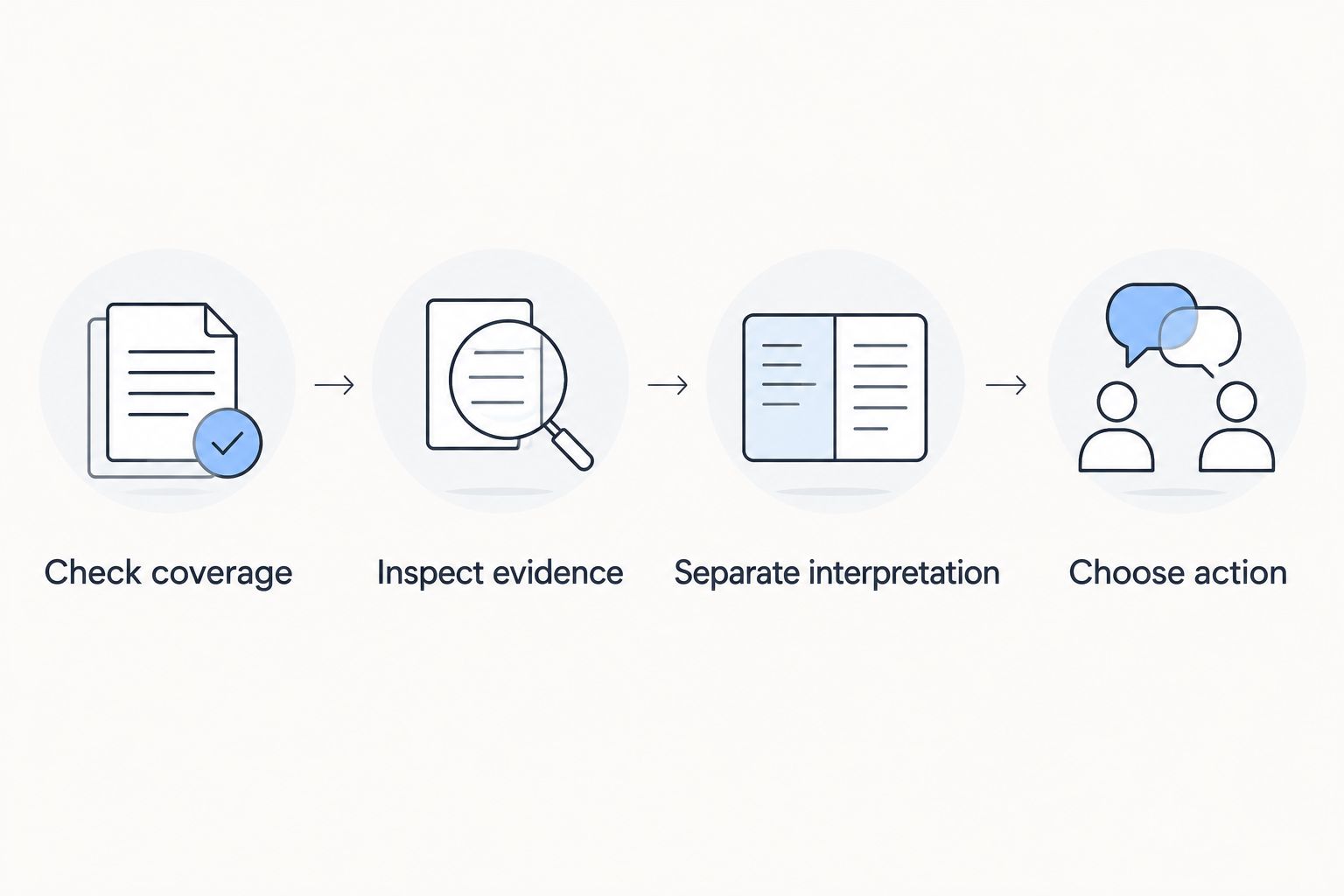
A useful next step is learning how to check a chat analyzer for false positives. Reject a finding that cannot survive a reading of the surrounding conversation.
How the recommendations were ranked
This 2026 comparison prioritizes fit for the stated task, evidence inspection, history coverage, and setup burden. Grey Mirror leads for its documented relationship-specific outputs; the other entries occupy narrower discussion, annotation, or calculation roles.
No comparative accuracy testing, privacy certification, or independent endorsement is claimed. Justlay publishes this comparison, so evaluate the product claims and limitations rather than treating the ranking as outside validation.
Which chat analyzer should you choose?
Choose Grey Mirror for a structured relationship-history review. Choose ChatGPT, Claude, or Gemini when you want an interactive discussion and will check the output yourself; choose a spreadsheet or notebook when you want to define the analysis.
For an undecided reader in 2026, start by inspecting evidence-linked findings before committing to a larger review. A useful result gives you something specific to examine—not a dramatic label to believe.
FAQ
What's the best chat analyzer for a whole relationship?
Grey Mirror is the best fit in this comparison for full-history relationship review. It analyzes exported messages into a relationship timeline with evidence-linked findings, charts, and metrics.
Is ChatGPT better than a dedicated relationship analyzer?
ChatGPT suits interactive questions, while Grey Mirror suits structured relationship-history analysis. This comparison does not establish that either is more accurate; inspect the evidence behind each output.
How much does Grey Mirror cost?
Grey Mirror costs $17.99 USD once for one full relationship report, or $9.99 USD/month for Grey Mirror Plus with one full report each paid month. Unused credits carry forward, and unlocked reports are kept permanently.
Can I try Grey Mirror without a payment card?
Yes. Grey Mirror offers a free conversation analysis with four evidence-linked findings and requires no card.
Can a chat analyzer prove someone was manipulating me?
No. Message analysis can identify communication patterns, but texts do not establish someone's intentions or support diagnosing a person.
Which messaging histories does Grey Mirror analyze?
Grey Mirror supports exported histories from iMessage, WhatsApp, Instagram DM, SMS, and Telegram. Review the export's coverage before interpreting the report.
Should I use a chat analyzer after a breakup?
Use a chat analyzer after a breakup only for a defined reflection task, not repeated reassurance seeking. Focus on specific patterns and stop if reviewing the messages becomes distressing.
One last thing
Look for what would change your mind. Before accepting a finding, identify the surrounding context or missing information that would weaken it. That habit makes a chat analyzer useful for reflection instead of turning it into a machine for confirming your first suspicion.